
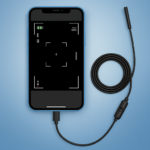
The Camera endoscope / OTG USB app allows you to transform your phone into an advanced inspection tool by connecting external cameras. It enables real-time exploration of hard-to-reach areas, such as tight pipes, small machine parts, or other narrow objects, directly from your device’s screen. The app leverages the USB OTG interface, providing support for various external inspection tools, including borescopes and microscopes, to capture detailed visual information.
External Camera Integration
This app is designed to work seamlessly with external inspection cameras that connect via a USB OTG interface. It supports a range of devices, including borescopes, microscopes, and other specialized inspection tools, turning your phone into a portable display and control unit for these instruments. This allows for detailed visual inspection in scenarios like plumbing, car maintenance, or electronics diagnostics where direct viewing is impossible.
Real-time Viewing and Media Capture
The app provides a real-time camera view, allowing you to observe live footage from the connected endoscope or microscope. Beyond live viewing, it supports capturing high-quality videos and still images. This functionality is crucial for documenting findings during an inspection, whether you are examining a pipe for blockages or scrutinizing tiny components of a machine.
Simplified Setup and Operation
Setting up the Camera endoscope / OTG USB app is straightforward. Users simply connect a compatible external camera to their device using a USB OTG cable, launch the app, and select the camera icon to begin a live view. The app features plug-and-play compatibility with various endoscopes, borescopes, and microscopes, aiming for stable and fast connections for immediate use.
In-App Media Management
All captured videos and photos are automatically stored and organized within the app’s built-in gallery. This centralizes your inspection media, making it easy to review past findings. The app also includes simple media management functions, allowing users to delete, view, and share their captured files directly from the gallery with a long press on any media item.




Write a review